Please select the type of consultation
AnyShare
AnyBackUp
AnyRobot

 Tiered Protection for Data Center
 Anti-ransomware Solution
 Kubernetes Data Protection
 Enterprise Cloud Disk Solution
 Intelligent Operation of Backup & Recovery System
Please select the type of consultation

We will contact you within 24 hours.
|
AnyShare Family 7.0.6.6 is Released, Featuring a New Intelligent Knowledge Management Experience!
【AnyShare Copilot】I. Comprehensive Upgrade of AnyShare Copilot InteractionAll-New Homepage, Unified Smart Portal for a Smoother Experience AnyShare 7.0.6.6 has undergone comprehensive optimization and upgrades to the homepage for intelligent knowledge management. The overall layout and functional distribution are clearer and more efficient. The new homepage is divided into the following core areas, designed to provide users with a more intuitive and personalized information management and knowledge collaboration experience: Welcome Zone: Located at the top of the homepage, it displays welcome messages and key notifications, helping users quickly understand platform updates. Agent Personalization Display Zone: Users can add frequently used intelligent agents to this area for one-click quick access, improving daily operational efficiency. Enterprise/Organization Activity Zone: Centrally presents content dynamics relevant to you, including "Recommended," "Recent" and "Activity," helping you stay informed about team activities and important changes. Personal Activity Zone: Allows users to add commonly used documents, WikiDoc, folders, online knowledge bases, and other resources to "Quick Access," creating a personalized workspace. AnyShare Copilot Interaction Zone: Skills Area: Provides commonly used skills such as Document Q&A, Document Summary, File Finder, Document Translator, and AI Writer. Users can select them directly based on needs. Conversation Interaction Area: Engage in natural language dialogue with the AnyShare Copilot here. The assistant can understand questions and return answers with images and text, while also providing suggested questions to guide further inquiry. 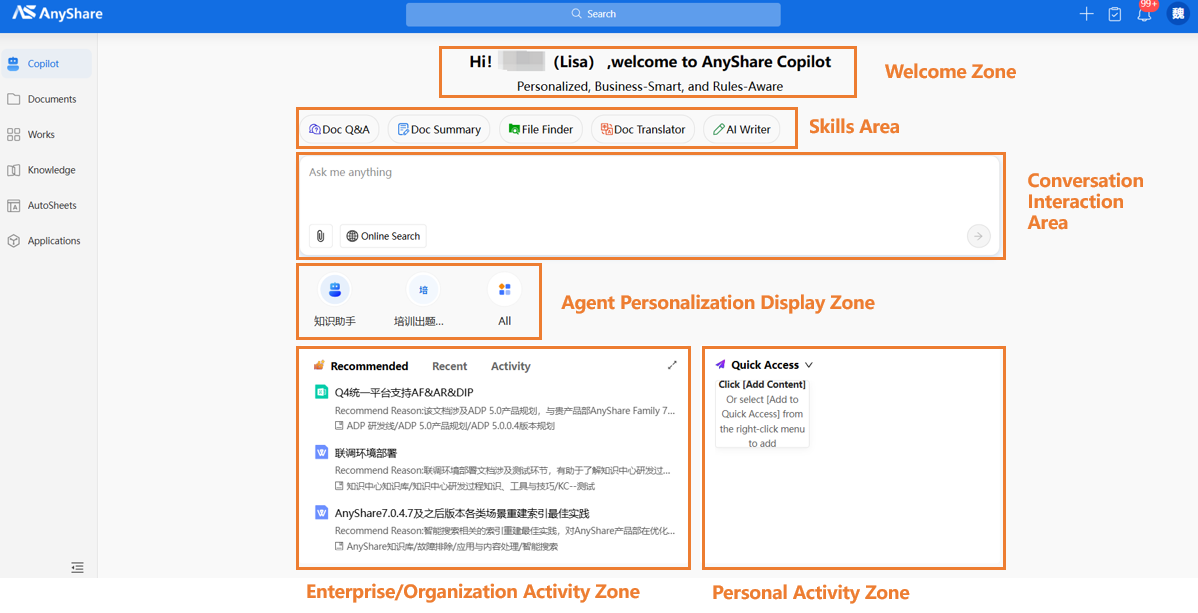 Intelligent agent applications are now categorized and displayed according to actual business scenarios, making them logically clear and easy to find. Users can independently add frequently used agents to the homepage shortcut entry for one-click access, significantly enhancing the overall user experience. 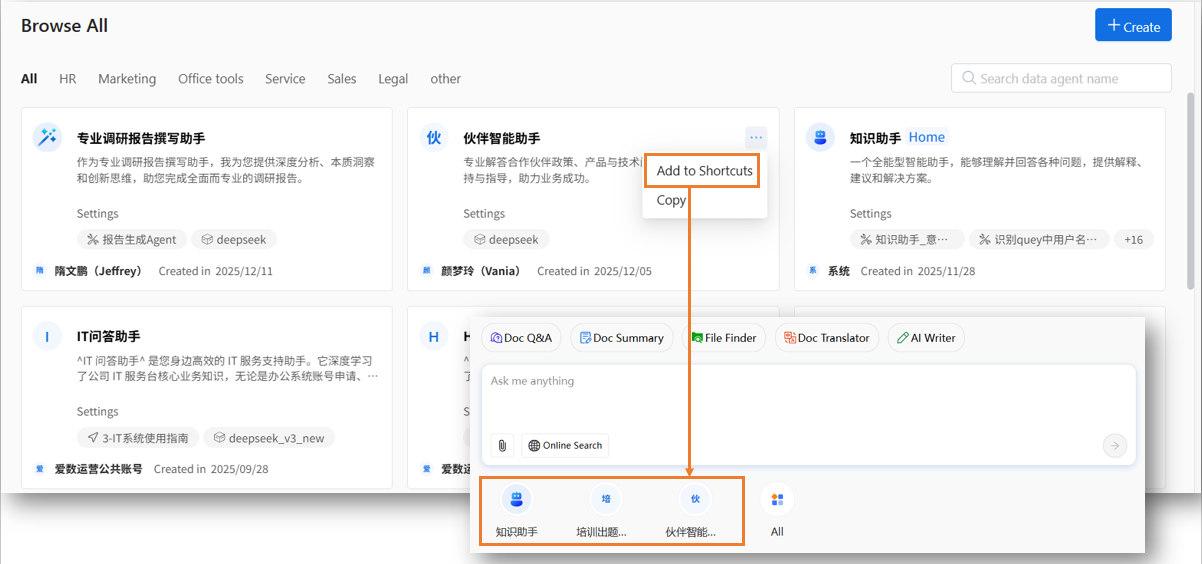 Multimodal Document Q&A, More Intuitive with Images and Text A new multimodal knowledge retrieval experience. Added image information recall functionality, which can automatically extract images from Word, PDF, PPT, WikiDoc, and FAQ files and integrate them directly into Q&A results, achieving true integration of images and text. This complementary format ensures informational completeness while making complex content easier to understand, significantly improving the interactive experience of multimodal knowledge retrieval. 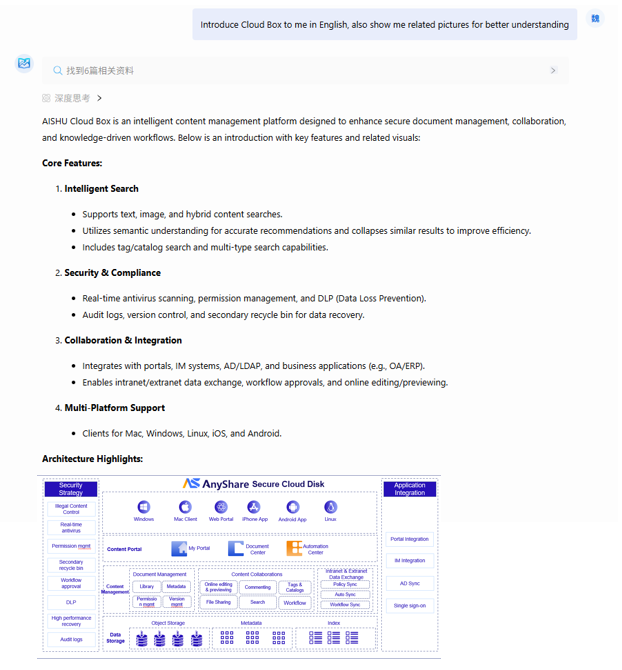 Optimized Answer Highlighting, More Efficient Information Acquisition By optimizing the highlighting strategy for answer content, core keywords and key information are prominently displayed. Simultaneously, reference source links are collapsed by default, making the answer structure clearer and the main points more distinct. This allows users to quickly grasp core ideas, reduce informational noise, and improve content readability and information acquisition efficiency. 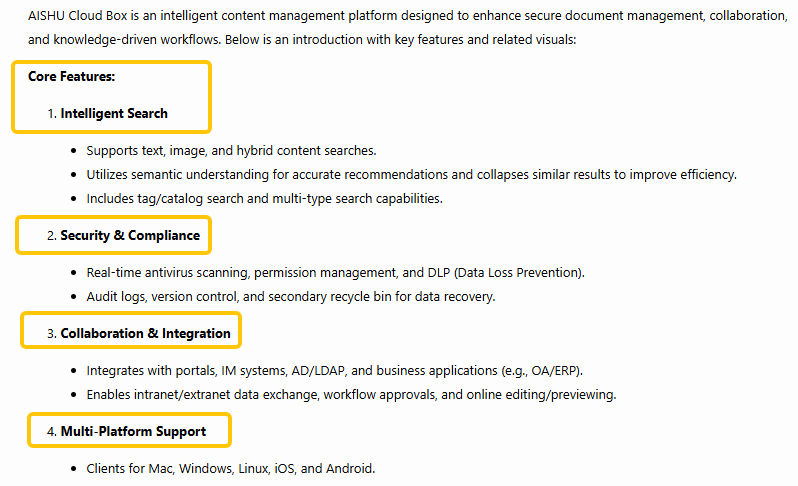 II. New AnyShare Copilot Operation Experience More Intuitive Intelligent Agent Operation Analysis The management console adds a new intelligent agent operation statistics module, supporting multi-dimensional data tracking and analysis, including number of users, session count, dialogue length, and downvote rate. It provides administrators with a panoramic view of operations, helping accurately identify high-frequency needs and answer quality, offering quantitative basis for optimizing agents, thereby driving comprehensive improvement in user experience and application effectiveness. 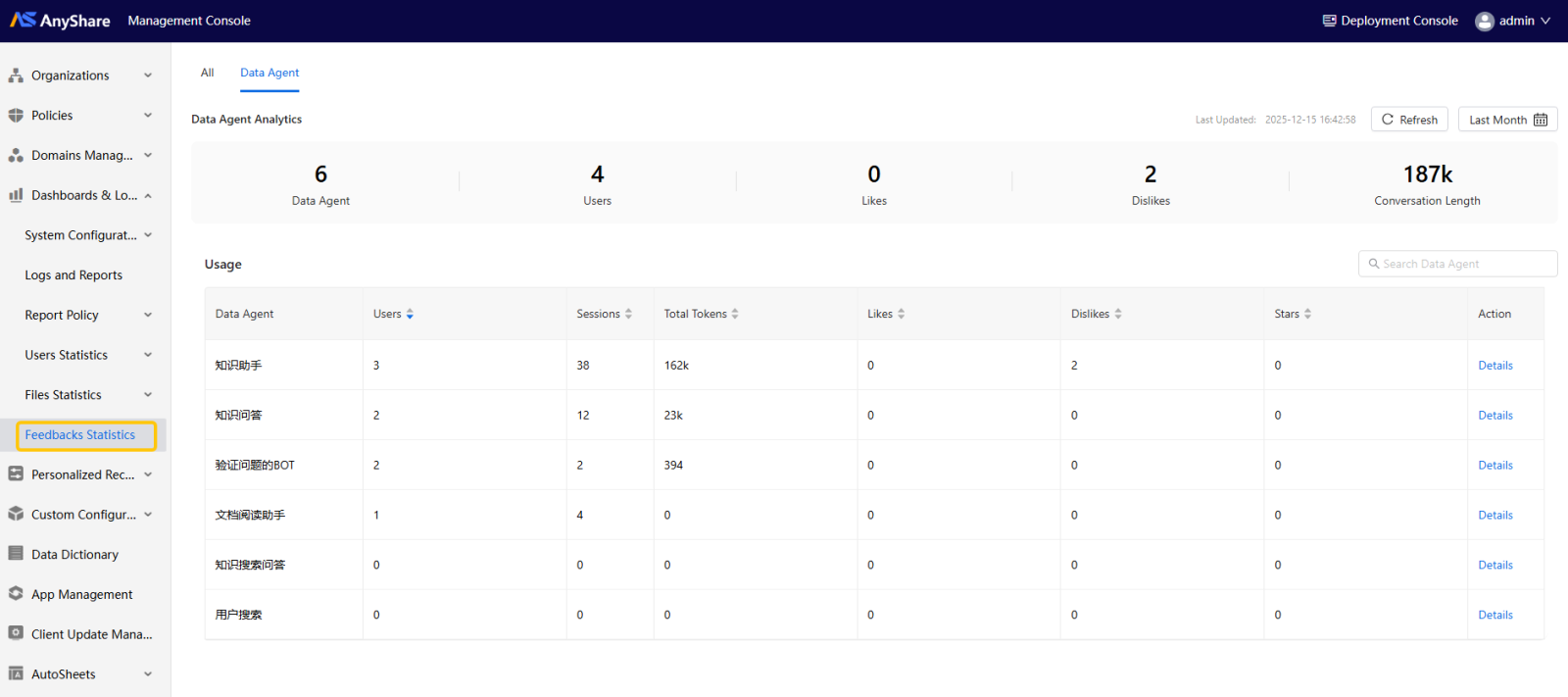 Optimized Answer Feedback Screenshot Experience The AnyShare Copilot feedback mechanism is optimized: when a user downvotes, the system will by default check and upload a screenshot of the current conversation, automatically capturing the context where the issue occurred. This ensures each piece of feedback comes with real context, providing a basis for precise analysis of answer deficiencies and continuously optimizing reply quality. 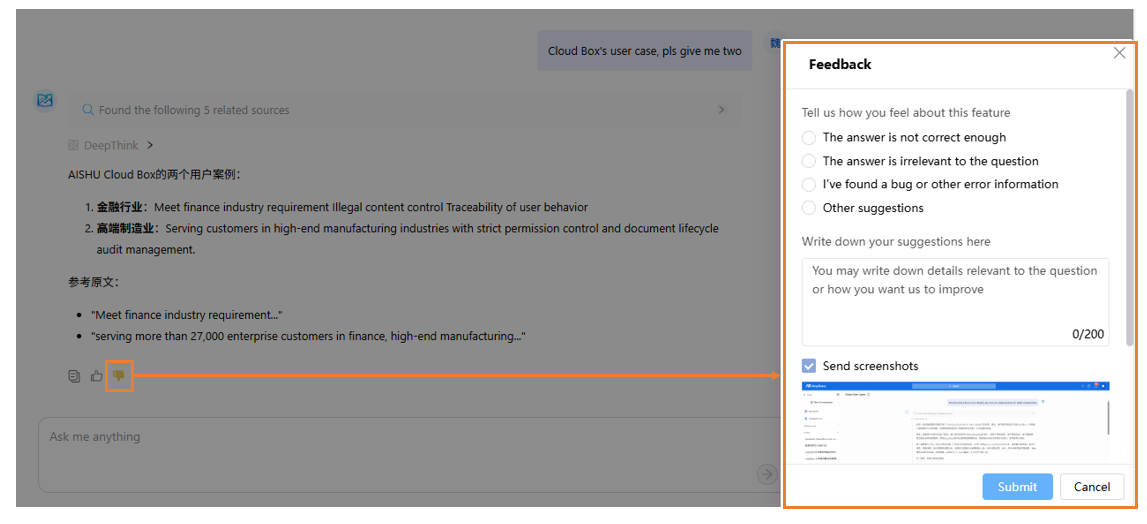
【Document Center】I. Index Rebuilding and EditingAdded manual index rebuilding and management functions for key roles such as document owners and knowledge base administrators. When document index construction is abnormal or fails, manual triggering of rebuilding is possible, ensuring the continued stability of knowledge retrieval services. 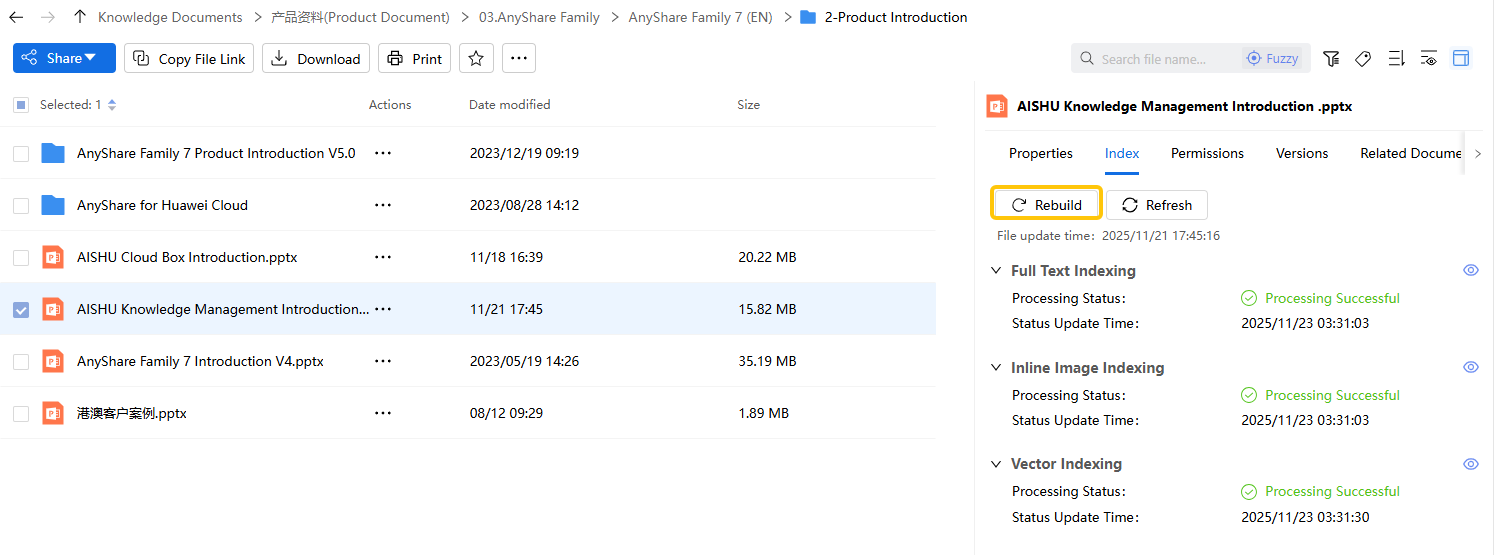 Added support for editing and revising vector index content, ensuring all the latest content can be retrieved instantly and accurately, fundamentally guaranteeing the continued stability and high availability of knowledge services. 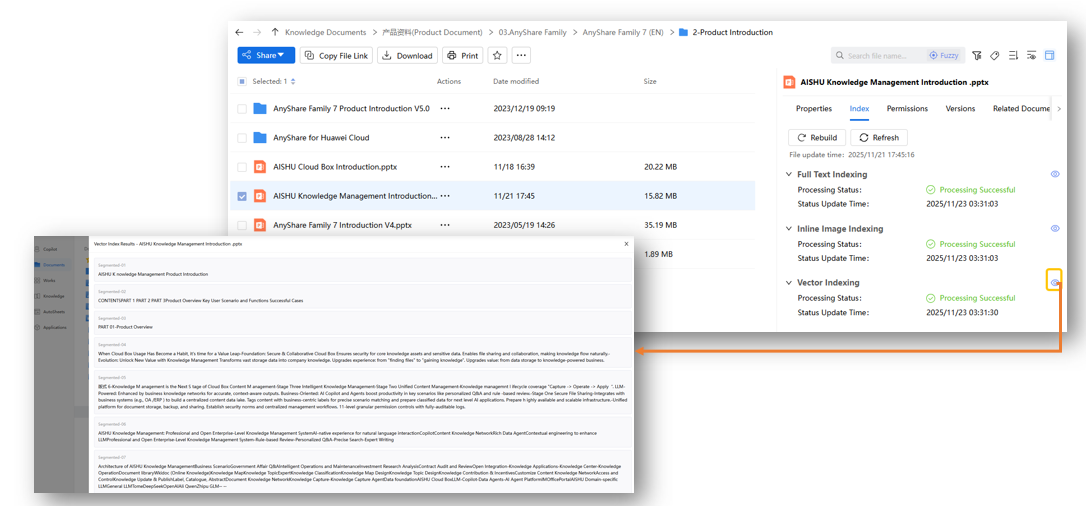 II. Online Printing and Print Permission Control Supports users with print permissions to directly select the print function in the preview interface for online printing of files, facilitating offline use. Supported document formats for printing include Word, Excel, PDF, PPT, etc. 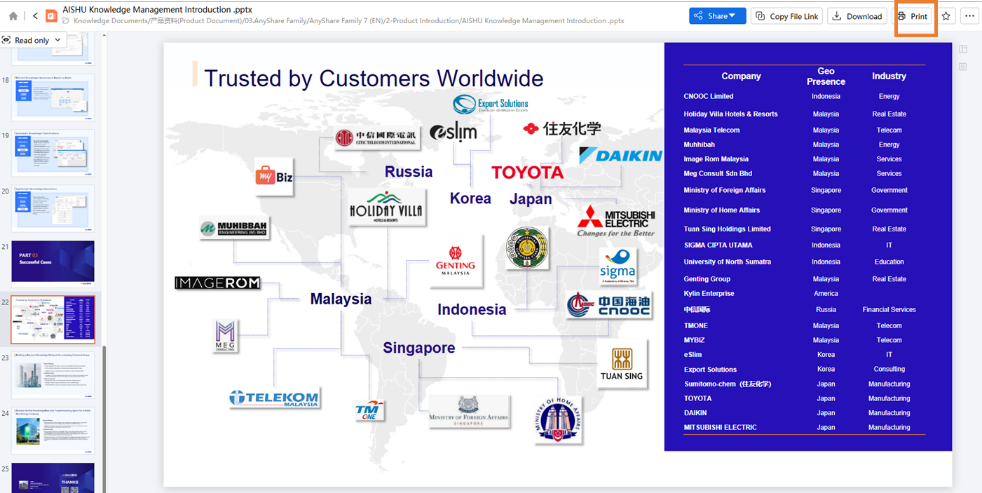 III. Support for Ultra-Large File Uploads The Web client now supports uploading single ultra-large files exceeding 5GB, meeting your needs for transferring large files (videos, design drafts, software packages, etc.). IV. Sharing Fixed Version Files Externally When generating external links, users can choose to share the current version of a file or folder, ensuring external recipients always access the specified version content. This avoids information disclosure issues caused by subsequent content updates and resolves external information inconsistency problems due to internal content iterations, enhancing the controllability of content collaboration. 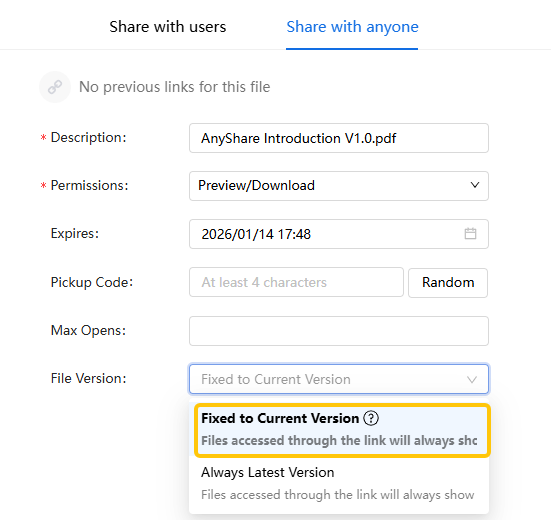 V. Bulk Sharing, Collaboration Efficiency Upgraded Again Supports selecting multiple files or folders simultaneously, uniformly setting access permissions and validity periods, and sharing them with specified colleagues or departments with one click. 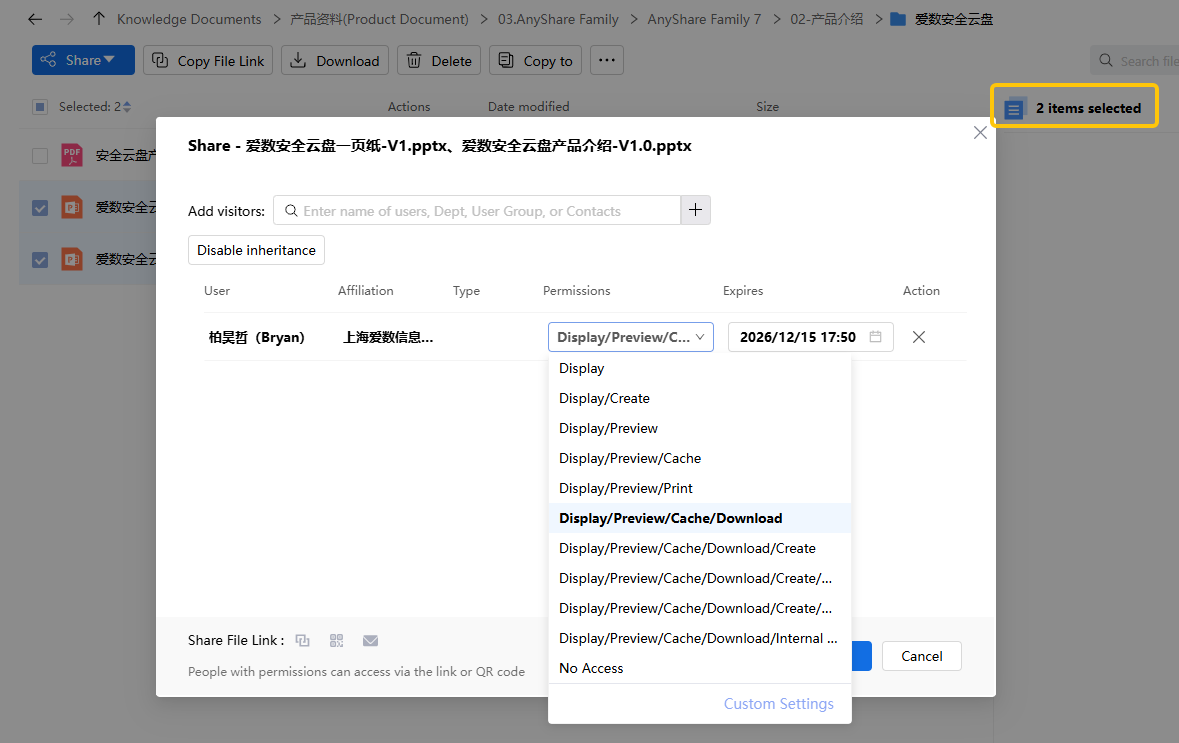 VI. Multiple Cataloging Templates, Keeping Knowledge Organized Supports users in flexibly selecting and applying different cataloging templates for files or folders. Each template sets complete attribute fields, achieving standardized classification and attribute management for different business scenarios. 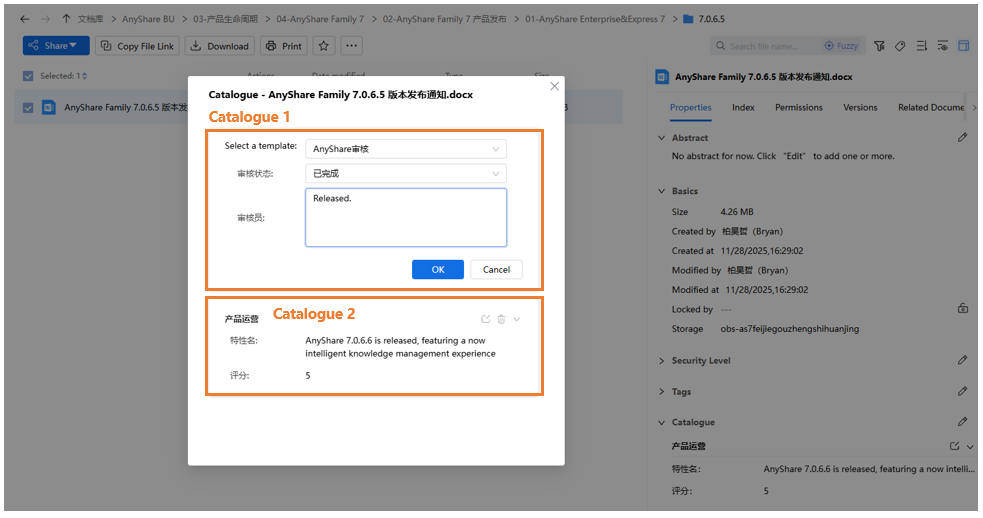 VII. Added Download Link Anti-Leak Function, Reducing File Leakage Risk Currently, when downloading documents from the AnyShare Web client, the system automatically generates a download link (valid for 15 minutes). This link could be copied to other browsers or devices for download, posing a document leakage risk. Therefore, an OSS gateway anti-hotlinking function has been added in this release. When enabled, it prevents download links from being copied and reused, effectively reducing file leakage risks and further enhancing system security. 【Knowledge Publishing Optimization】I. Unified Knowledge Publishing PortalA new document quick publishing portal has been added to the homepage, allowing users to publish documents from the Document Center, personal knowledge bases, or local files to the enterprise online knowledge base with one click. It bridges the path from knowledge creation to sharing, significantly simplifying the publishing process, empowering efficient accumulation and growth of enterprise knowledge assets. 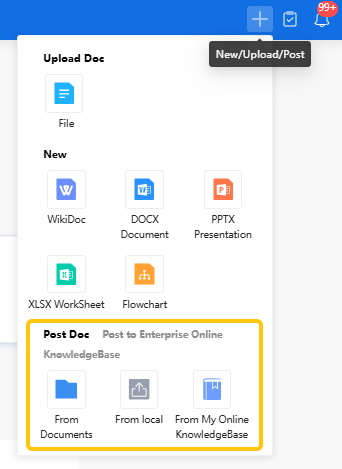
【Client Optimization】AnyShare client introduces a multi-tab operation mode in the new version. Users can handle multiple tasks in parallel within the same window, effectively improving operational flexibility and efficiency.Note: To ensure a stable transition for user experience, the current version retains the classic multi-window mode simultaneously. It is expected that after one or two versions of user habit cultivation, a full transition to the more efficient multi-tab mode will be made to continuously optimize the user experience. 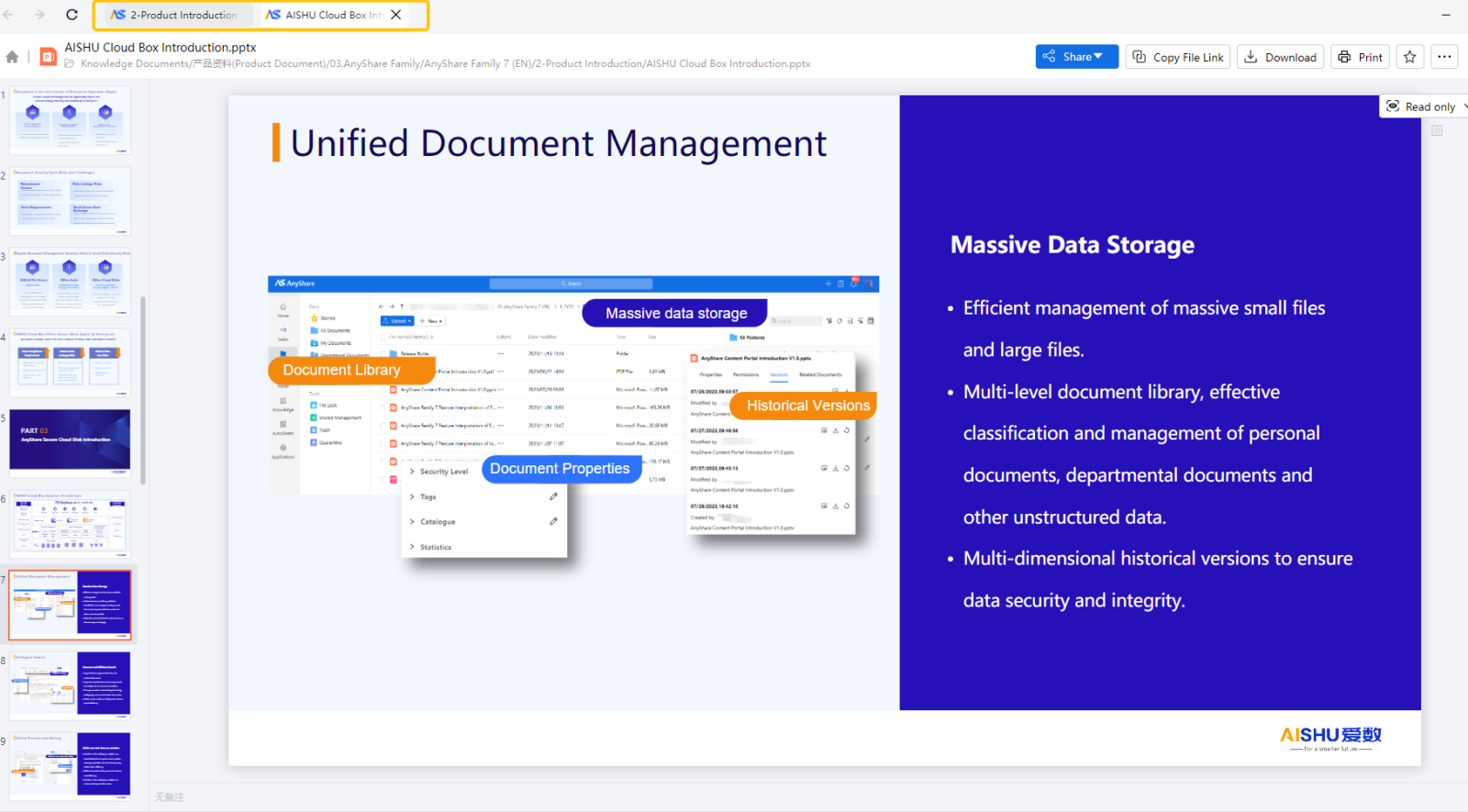
【Enhanced Compatibility】Compatibility Upgraded Again, Expanding Enterprise Deployment OptionsAdded comprehensive support for Dameng Database V8.1.4.80 and completed in-depth adaptation with OceanBase V4.2.5.2, further strengthening compatibility with the domestic database ecosystem. Simultaneously, added support for connecting to Volcano Engine Object Storage Service, expanding the compatibility range of object storage, providing enterprises with more flexible and secure data storage solutions. |
Was this helpful?
Must be valid email.
SubmitEnter your email upper to be notified about new articles.
You have successfully subscribed, thank you
Subscription failed, please try again
Must be valid email.
SubmitEnter your email upper to be notified about new articles.
You have successfully subscribed, thank you
Subscription failed, please try again
Choose “subscribe” to receive AISHU’s product information updates.


©2006-2024 AISHU Technology Corp. All Rights Reserved.
 Select Language
Choose “subscribe” to receive AISHU’s product information updates.
Select Language
©2006-2024 AISHU Technology Corp. All Rights Reserved.
Choose “subscribe” to receive AISHU’s product information updates.
Select Language
©2006-2024 AISHU Technology Corp. All Rights Reserved.


support@aishu.cn(Japan & Korea)